












Safety Data Sheet Management System | Online MSDS software
Overview

A connected EHS platform across audit, incident and risk in one place.

Audit & Inspection

Standardise inspections and audits — schedule, capture findings and close actions.

Incident Management

Report, investigate and learn from incidents with real-time field reporting.

CAPA Management

Track CAPAs with owners, due dates and independent sign-off before closure.

Incident Investigation

Guided 5 Whys, fishbone and decision-tree investigations with defensible evidence.

Safety Training

Assign by role and site, and catch expiring certifications before they lapse.

Compliance Reporting

OSHA 300, RIDDOR and WHS output produced from the records you already hold.

Risk Management

Identify, assess and control workplace risk across every site and team.

Contractor Management

Approval before they start, documents that carry their expiry, and every company on one register.

SDS Management

Build, organise and share your SDS library with QR-code access for employees.

ExactSDS

Author your own GHS-compliant Safety Data Sheets in 40+ languages.

DirectSDS

Distribute your SDSs directly to customers and partners — no email needed.

Risk Assessment

Assess chemical risks across your workplace and document required controls.

Chemical Inventory Management

Track inventory, approvals and restricted-substance lists across locations.

Free SDS Search

Search 30 million+ Safety Data Sheets — free, no account needed.

Free SDS Management Tool

Manage your SDS library with our free tool — no credit card required.

Secondary Label Generator

Generate GHS-compliant secondary container labels in seconds.

Transport Label Generator

Print ADR / DOT compliant transport labels straight from any SDS.

Pricing
About UsOur mission and the story behind SDS Manager.Our TeamMeet the people building chemical safety software.CertificationsSecurity, privacy and quality standards we comply with.Contact UsReach our sales and support teams.
ArticlesIn-depth guides on SDS management and EHS compliance.NewsLatest chemical safety and HSE updates from around the world.WebinarsLive sessions and on-demand recordings from our safety experts.
Customer StoriesHow real companies use SDS Manager to stay compliant.Content LibraryFree templates, checklists and whitepapers you can download.Help & FAQSearchable knowledge base and answers from our support team.
US News

TEST NEWS SCHEDULE B

Read more
EU News

Regulations that Chemical Retailers must know being the Responsible Party to provide SDS

Read more

eu

auatcacndedkeleseeeufifr
hihuidisitjpltlvmtnlnonz
plptrorusesksltruaukusvn

CAPA management software

Spend less time chasing CAPAs, more time closing them

Actions track their own progress, remind whoever owns them, and go for sign-off on their own. Corrective and preventive actions from an incident, an investigation finding, a failed inspection or a risk, all in one list. You find out where things stand by looking, not by asking.

Book a walkthroughStart free trial
A supervisor and an engineer reviewing open actions on site
Trusted by10,000+ Safety Managers
Porsche
DeLonghi
Zircoa
Unilever
DHL
Thule
TESMEC
ISAVIA
Innvik AS
DAHLRAIL
Hans Claussen AS
Isfjord Norway
Heide & Cook, LLC
Porsche
DeLonghi
Zircoa
Unilever
DHL
Thule
TESMEC
ISAVIA
Innvik AS
DAHLRAIL
Hans Claussen AS
Isfjord Norway
Heide & Cook, LLC

An action list is easy. Closing it honestly is the hard part.

Every system can hold a list of actions with dates against them. The question is who does the chasing, what happens when one slips, and whether “closed” means somebody checked or just that somebody ticked.

Also called
CAPA software, corrective action tracking software, action management software
Actions can be raised from
An incident, an investigation finding, a failed inspection item, a hazard report, or a risk register entry
Standard it supports
ISO 45001 clause 10.2, Incident, nonconformity and corrective action
The difference

What changes when actions chase themselves.

Every system can hold a list of actions with dates against them. What separates them is who does the chasing, what happens when an action slips, and whether closed means somebody checked or only that somebody ticked.

Legacy EHS platforms compared with EHS Solutions by SDS Manager
SituationLegacy EHS platformsEHS Solutions by SDS Manager
An action is due Friday and it's Wednesday Legacy EHS platformsYou email the owner to ask. The answer arrives on Thursday, or it doesn't. EHS Solutions by SDS ManagerProgress moved as tasks were ticked, so you saw it stall in week two and had time to act.
The person who did the work says it's done Legacy EHS platformsThat's the close. The fix is confirmed by the only person with a reason to say it worked. EHS Solutions by SDS ManagerSign-off goes to a second person. The owner cannot verify their own work, and which roles can is part of your configuration.
An auditor asks who confirmed the fix held Legacy EHS platformsA tick and a date, and whatever anyone can still remember. EHS Solutions by SDS ManagerA name, a date, and the evidence they looked at, on a record that cannot be amended afterwards.

Everyone in this market has an action list. The question is what "closed" means on it.

  • Actions chase themselves

    Reminders, escalation and submission for sign-off happen without anybody prompting them.

  • Two people, always

    Whoever did the work cannot be the person who signs it off.

  • Configured, not coded

    We set up your priorities, due-date rules and sign-off roles. You don't.

See it running on your own process, not a demo dataset.Book a walkthrough
Capabilities

From a finding to a fix somebody actually checked

How the work gets tracked, who confirms it worked, what happens to the problems that haven't happened yet, and what all of it looks like across every site.

Action tracking

See where every action stands without asking anyone

An action gets an owner, a date and a set of tasks. After that the tracking, reminding and submitting happen without you.

  • You stop relaying status updates Each task has its own owner, so maintenance, engineering and training update their work directly.
  • You see trouble in week two, not on the due date Progress moves as tasks are ticked, so a stalled action shows while there's still time.
  • Nothing sits finished but unclosed Ticking the last task submits the action for verification by itself, without anyone remembering to.
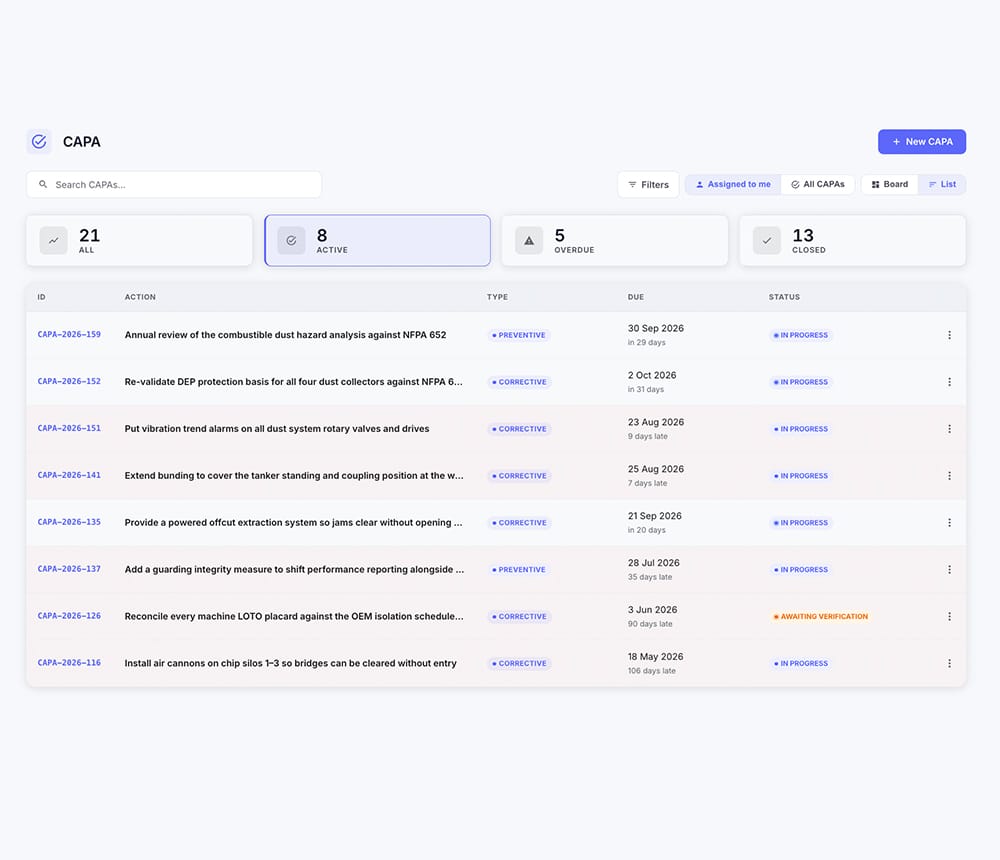
The CAPA list, showing each action's owner, due date and status
Verification

Know the fix actually worked

In most systems whoever did the work also marks it done — which is how actions get closed that never fixed anything, and how the same incident comes back six months later. So sign-off goes to a second person, and "closed" becomes evidence somebody looked rather than an opinion from whoever wanted to move on.

  • An auditor gets a name, not a tick Whoever confirmed the fix is named on the record, and it isn't whoever made it.
  • A weak fix comes back instead of passing The verifier returns it with a written reason, and the history of attempts stays together.
  • The incident can't quietly close first A case stays open while its actions are open, so nothing falls into the gap.
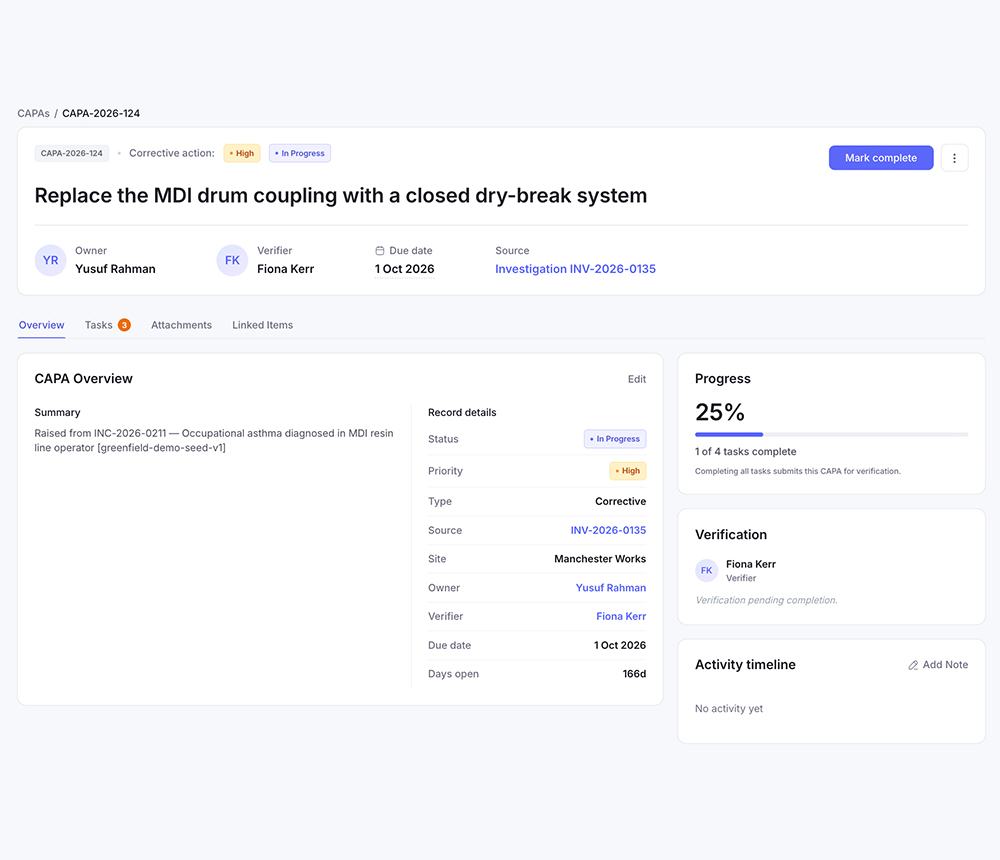
A CAPA record with its named owner and verifier, and verification pending completion
Preventive actions

The fix for the one that hasn't happened yet

Corrective action closes what went wrong. Preventive action closes what nearly did — a pattern across sites, a hazard somebody reported, a risk whose controls aren't holding. The page is called corrective and preventive because both belong on the same track.

  • Raised from a pattern, not just an event Three similar near misses across two sites is a case for action, with nobody hurt.
  • The same track, the same rigour Owner, tasks, due date, escalation and independent verification, exactly as a corrective action gets.
  • Linked to the risk it reduces An action against a register entry feeds the residual score once it has been verified.
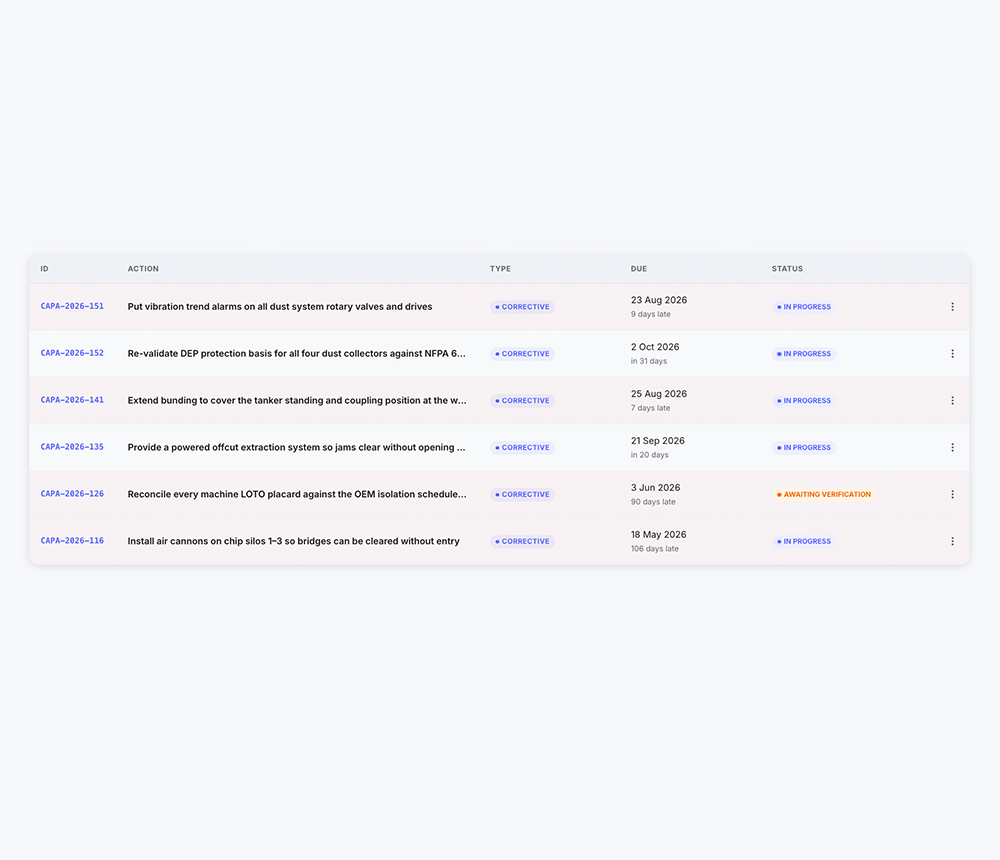
The action list, each row carrying its type, due date and status
Across every site

Every open action, without a status meeting

The question a safety manager gets asked is never about one action. It's how many are open, how many are late, and whether that's getting better or worse.

  • Open actions by site, owner and age Sort by what is oldest rather than loudest, and see which site carries the backlog.
  • Overdue, and by how long A week late and four months late are different problems, and counting them together hides both.
  • How long closure actually takes Average days from raised to verified, per site and per source, so slow steps show.
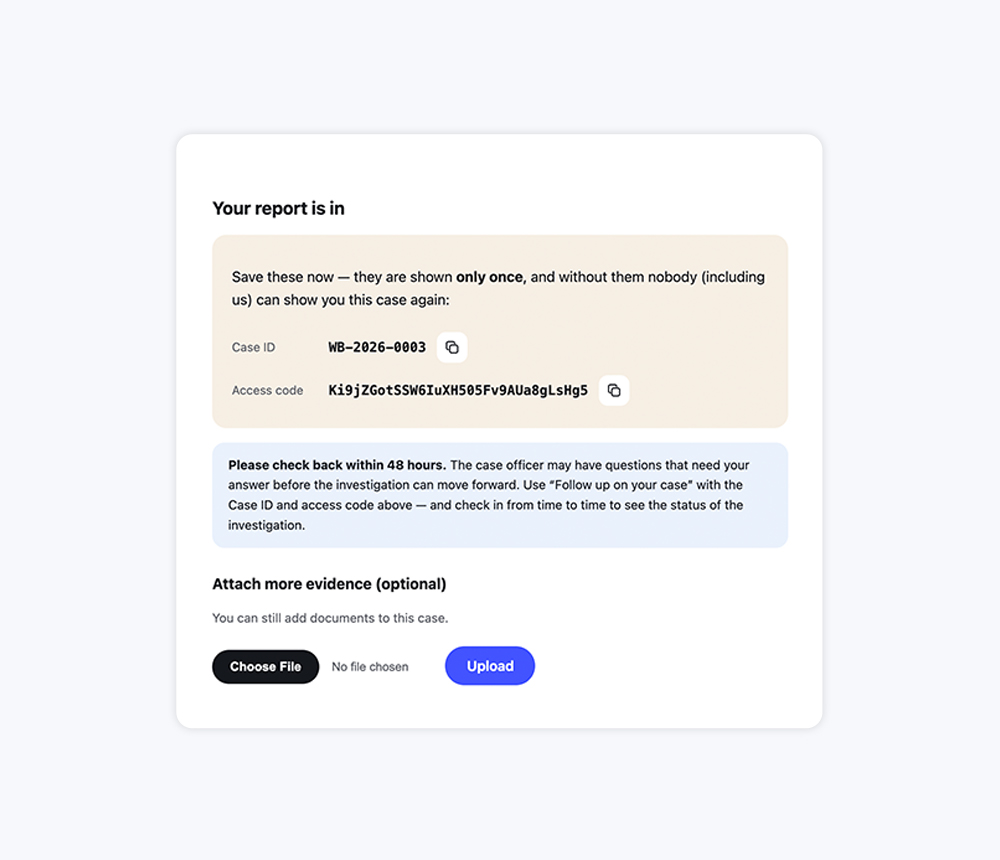
A submitted report's confirmation, with the case ID and access code for following it up

Bring us your action list

Show us how actions get raised, chased and closed today, and we'll show you the same thing running here.

Book a walkthrough

In practice

Workers reviewing safety records together on site
“An action can be raised on its own or fall out of an inspection, an investigation or a risk, and either way it carries an owner and a date and stays attached to whatever it came from. Before this the link between a finding and its fix was an email thread I was the only copy of.”
Head of SafetyPaper and packaging manufacturer · 1,200 employees, North America
One system

Corrective and preventive actions are one part of the platform

An action never lives alone — it's tied back to the incident, inspection, investigation or risk that raised it, and forward to the risk register once it's verified. One site structure, one permission model, one history.

Incident ManagementReport injuries, near-misses and hazards from any device, then triage and classify them.Incident InvestigationGuided 5 Whys, fishbone and decision-tree investigations with evidence you can defend.Risk ManagementIdentify hazards, score risk on your own matrix and track the controls that reduce it.Contractor ManagementApproval before they start, documents that carry their expiry, and every company on one register.Audit & InspectionMobile checklists, recurring schedules and consistent scoring across every site.Safety TrainingAssignment by role and site, with certification expiry surfaced before it lapses.Compliance ReportingOSHA 300, 300-A and 301, RIDDOR and WHS output produced from the records you already hold.
Assets & MaintenanceEquipment register with preventive maintenance and calibration schedules and pass or fail outcomes.
Document ControlVersioned policies and certificates with expiry tracking and full change history.
What it costs

The software is the invoice

Legacy vendors quote a license, then bill the setup, the migration, the training days and every change afterwards. It's a relic of an era when software took a year to install.

You pay for the software, not the consultants.

Priced on headcount, however many sites you run. Under 200 people, start a free trial and go. Above that, ask us for a number and you'll get one.

On your invoice
  • The software
  • Every module
  • Your headcount
  • Setup of your rules
  • Reports built for you
  • Changes, whenever
  • Support
Never on your invoice
  • Implementation fee
  • Configuration project
  • Consulting hour blocks
  • Change requests
  • Professional services minimum
  • Data extraction on exit
  • No implementation fee
  • No professional services minimum
  • No hours to buy for changes
Questions

Frequently asked questions

Still have questions? Our safety experts will answer them against your own process rather than generically.

Talk to our safety experts
CAPA software tracks corrective and preventive actions, the work that comes out of a problem, from the moment an action is raised to a verified, closed record. In EHS Solutions by SDS Manager it sits in the same system as incident management, investigations, audits and risk, so an action always carries the finding it came from rather than living in a separate tracker.
The difference between a corrective action and a preventive action is whether the problem has already happened. A corrective action fixes something that went wrong and stops it recurring. A preventive action addresses something that hasn't gone wrong yet: a pattern across sites, a hazard somebody reported, a risk whose controls aren't holding. In EHS Solutions by SDS Manager both run on the same track, with the same owner, dates, escalation and independent verification, and they're counted separately in reporting because a programme that is entirely corrective is a programme that only ever reacts.
No, the person who did the work cannot sign it off. The owner and the verifier are always two different people. Which roles qualify as a verifier is part of your configuration, but the separation itself isn't optional, because a fix confirmed by the person who made it isn't independent evidence.
No, actions don't have to come from an incident. They can be raised from an investigation finding, an incident or near miss, a failed inspection item, a failed maintenance or calibration check, a risk on the register, or on their own as preventive work against a trend. They all land in the same action list rather than four separate trackers.
Task owners are notified by email and mobile push when work is assigned to them, and again as the due date approaches. Each task inside an action has its own owner and date, so maintenance, engineering and training update their own part directly rather than reporting progress through the safety manager.
Yes, different departments can own different parts of one action. Each task has its own owner and date, so maintenance, engineering and training can each hold a piece while one person stays accountable for the action as a whole.
When an action goes overdue it escalates on its own rather than ageing in a list nobody opens. Progress moves as individual tasks are ticked, so a stalled action is visible in week two rather than on the due date, and slipping work reaches a manager without anyone having to chase it.
Yes. ISO 45001 clause 10.2 requires you to react to an incident or nonconformity, evaluate the need for action to eliminate the root cause, implement it, review whether it was effective, and retain documented information on both the actions taken and the results. In EHS Solutions by SDS Manager the effectiveness review is the verification step, performed by someone other than the person who did the work, and the record of it can't be amended afterwards.
Yes, it works for compliance task management. A regulator's requirement, an audit finding or a certification condition is tracked the same way, with an owner, a due date, escalation and verified closure, alongside safety actions rather than in a separate list.
Yes, your existing action list comes across at onboarding. A spreadsheet or an export from a previous system is brought in with owners, due dates and status intact, so open work doesn't restart from zero and closed work stays as history.
Chemical and SDS management connects directly, because EHS Solutions by SDS Manager is built by SDS Manager, whose core product is a chemical and safety data sheet compliance database. When an action involves a substance, such as a COSHH control, a substitution, or a change to how something is stored, the safety data sheet is in the same system as the action rather than in a separate library somebody has to go and search. SDS Manager is part of the NetPower group, headquartered in Norway with offices in the United States, Vietnam and Bangladesh.
Setup takes days, and your team's part is describing how actions get raised, chased and closed today. In EHS Solutions by SDS Manager your priorities, due-date rules, escalation points and sign-off roles are configured before go-live, by our team. There's no implementation fee and no consulting hours to buy.

Bring us your action list

Show us how actions get raised, chased and closed today, and we'll show you the same thing running here.
Start free trialorBook a walkthrough
Set up around your own priorities, due-date rules and sign-off requirements.

SDS Manager AS

  • Safety Data Sheet management for users of chemicals, retailers, webshops and manufacturers

Solutions

  • SDS Manager - SDS Management, Compliance & Employee Access
  • DirectSDS - SDS Distribution for eCommerce and Distributors
  • ExactSDS - SDS Authoring, Creation & Translation

Free Tools & Services

  • Free SDS Search with Update Notifications
  • Free SDS Management Tool for Small Businesses
  • Free generator for Secondary Container Labels
  • Free Tool for Generating Transport Labels

Company

  • About Us
  • Partner Program
  • Contact Us

Address

Thunesvei 2, 0274 Oslo Norway

+44 20 3936 1240

Privacy PolicyTerms and ConditionsCertificationsService Fulfillment Policy
©2026 SDS Manager |All rights reserved