












Safety Data Sheet Management System | Online MSDS software
Overview

A connected EHS platform across audit, incident and risk in one place.

Audit & Inspection

Standardise inspections and audits — schedule, capture findings and close actions.

Incident Management

Report, investigate and learn from incidents with real-time field reporting.

CAPA Management

Track CAPAs with owners, due dates and independent sign-off before closure.

Incident Investigation

Guided 5 Whys, fishbone and decision-tree investigations with defensible evidence.

Safety Training

Assign by role and site, and catch expiring certifications before they lapse.

Compliance Reporting

OSHA 300, RIDDOR and WHS output produced from the records you already hold.

Risk Management

Identify, assess and control workplace risk across every site and team.

Contractor Management

Approval before they start, documents that carry their expiry, and every company on one register.

SDS Management

Build, organise and share your SDS library with QR-code access for employees.

ExactSDS

Author your own GHS-compliant Safety Data Sheets in 40+ languages.

DirectSDS

Distribute your SDSs directly to customers and partners — no email needed.

Risk Assessment

Assess chemical risks across your workplace and document required controls.

Chemical Inventory Management

Track inventory, approvals and restricted-substance lists across locations.

Free SDS Search

Search 30 million+ Safety Data Sheets — free, no account needed.

Free SDS Management Tool

Manage your SDS library with our free tool — no credit card required.

Secondary Label Generator

Generate GHS-compliant secondary container labels in seconds.

Transport Label Generator

Print ADR / DOT compliant transport labels straight from any SDS.

Pricing
About UsOur mission and the story behind SDS Manager.Our TeamMeet the people building chemical safety software.CertificationsSecurity, privacy and quality standards we comply with.Contact UsReach our sales and support teams.
ArticlesIn-depth guides on SDS management and EHS compliance.NewsLatest chemical safety and HSE updates from around the world.WebinarsLive sessions and on-demand recordings from our safety experts.
Customer StoriesHow real companies use SDS Manager to stay compliant.Content LibraryFree templates, checklists and whitepapers you can download.Help & FAQSearchable knowledge base and answers from our support team.
US News

TEST NEWS SCHEDULE B

Read more
EU News

Regulations that Chemical Retailers must know being the Responsible Party to provide SDS

Read more

eu

auatcacndedkeleseeeufifr
hihuidisitjpltlvmtnlnonz
plptrorusesksltruaukusvn

Safety training software

Safety training software that knows who is qualified

Training assigns itself by role and site, people complete it on a phone, and expiring certificates surface weeks before they lapse rather than during an audit.

Book a walkthroughStart free trial
A trainer running a safety briefing with a small group on site
Trusted by10,000+ Safety Managers
Porsche
DeLonghi
Zircoa
Unilever
DHL
Thule
TESMEC
ISAVIA
Innvik AS
DAHLRAIL
Hans Claussen AS
Isfjord Norway
Heide & Cook, LLC
Porsche
DeLonghi
Zircoa
Unilever
DHL
Thule
TESMEC
ISAVIA
Innvik AS
DAHLRAIL
Hans Claussen AS
Isfjord Norway
Heide & Cook, LLC

A record of who completed what isn't the same as knowing who's qualified

Most systems can store completions. The question is whether anything tells you about the new starter nobody enrolled, the person who failed and never retook it, and the certificate that expires three weeks before your next client audit.

Also called
Safety training management software, competency management software, EHS training software
How assignment works
By criteria — role and site — not by name, so whoever joins next month is enrolled on arrival
Standard it supports
ISO 45001 clause 7.2, Competence
The difference

What changes when the criteria hold the list.

Most systems can store completions. What separates them is whether anything tells you about the new starter nobody enrolled, the person who failed and never retook it, and the certificate that expires three weeks before your next client audit.

Legacy EHS platforms compared with EHS Solutions by SDS Manager
SituationLegacy EHS platformsEHS Solutions by SDS Manager
A new starter joins in a role that needs an induction Legacy EHS platformsSomebody has to notice, find the right course and enrol them. It happens when it happens. EHS Solutions by SDS ManagerThe criteria hold the list. They're enrolled on arrival because their role and site match, without anyone remembering.
Someone fails the knowledge check Legacy EHS platformsIt sits in a completion report until a manager reads the report. EHS Solutions by SDS ManagerThe course reassigns itself, and the failure rate for that course is visible rather than buried in individual records.
A client audit asks for contractor competency Legacy EHS platformsContractors are in a different spreadsheet, if they're recorded at all. EHS Solutions by SDS ManagerSame system as employees, exportable per person, course or site.

The question is never who attended. It is who is qualified right now.

  • A course library, or your own

    Coursera-style courses ready to assign, or your existing video, documents and written material.

  • Assignment holds itself

    Criteria by role and site, so new starters are enrolled the day they arrive.

  • Configured, not coded

    Your courses, role criteria and renewal periods are set in a no-code rule pack engine, and we configure them before go-live.

See it running on your own process, not a demo dataset.Book a walkthrough
Capabilities

Competency management, without a matrix

How training finds the right people, how it gets done without a desk, and how you find out about an expiry before an auditor does.

Training assignment

Stop maintaining a list of who needs what

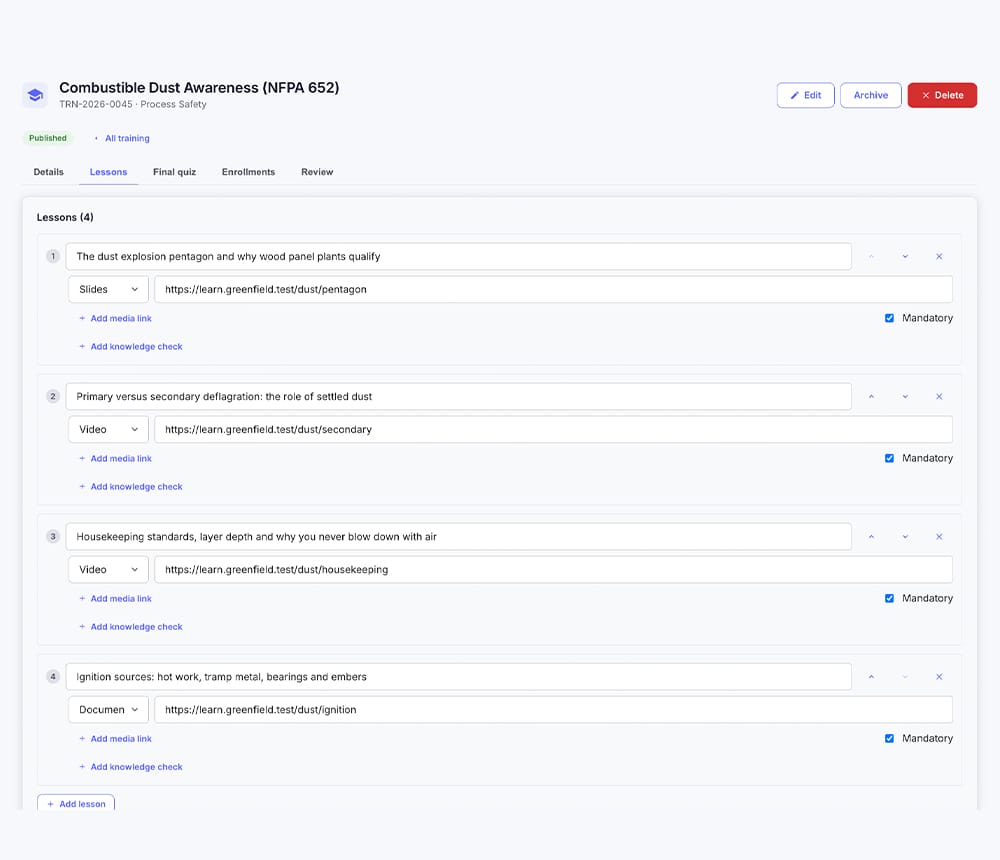
Training gets missed because assignment is manual — someone has to notice a new starter, a role change or a transfer. Here the criteria hold the list: define who needs a course by role and site, and the right people are enrolled as they arrive.

  • A course library to assign from Comprehensive Coursera-style courses ready to assign, or your own video, documents and written material.
  • New starters enrol themselves Someone joins in a role that needs an induction and they are already assigned it.
  • Targeted by role and site, not by name Assign to all press operators at three sites, including whoever joins the role next month.
  • Department means your site structure Targeting follows the same hierarchy as the rest of the system, down every level.
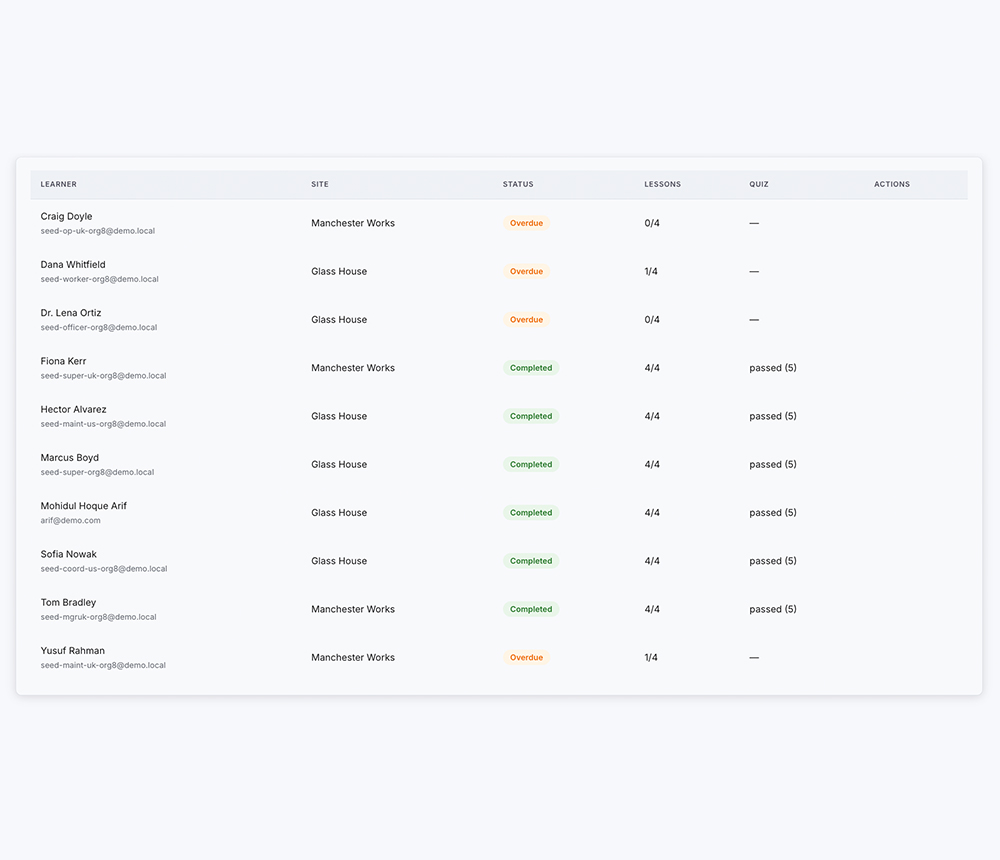
Training assigned by role and site rather than by name
Course delivery

Train people without pulling them off the floor

Frontline training competes with production. If it needs a desk and a fixed hour it slips, so lessons and knowledge checks work on a phone in whatever gaps exist — and the record of what someone confirmed they read is kept.

  • Lessons in the format that suits the content Video, documents or written material, worked through step by step with progress saved throughout.
  • Knowledge checks that actually gate The lesson isn't complete until the check is passed, and the answer key stays hidden.
  • Attestation is recorded, not assumed For mandatory reading, the confirmation is captured against their record rather than taken on trust.
  • Certificates issued on completion A dated certificate with the training, the score where relevant, and a verification reference.
A lesson being worked through, with progress saved
Certification tracking

Renew certificates before they lapse, not after

An expired certificate discovered during an audit is a finding. Discovered a month early it's an email. Every qualification carries its own expiry, and the system chases it while there's still time to act.

  • Reminders before, escalation after Email and mobile push as the due date approaches, then escalation to their supervisor.
  • A failed check reassigns itself Somebody who doesn't pass is re-enrolled automatically, and failure rates per course stay visible.
  • Expiry reopens the training, not a new record A lapsed qualification resets the same record, with the history of previous cycles intact.
  • A live competency picture Who is qualified for what, per site or across the group, without assembling spreadsheets.
Certification tracking, with qualifications due to lapse flagged

Supervisors notified for anything overdue. Refreshers are already enrolled for the 30-day group.

Bring us your training matrix

The spreadsheet with names down the side and courses across the top. We'll show you it tracking itself.

Book a walkthrough

In practice

Workers reviewing safety records together on site
“Courses run inside the system, so completion and failure rates are simply there rather than something I build. When someone doesn’t pass it puts them back through without me noticing first, which used to be a job I did every quarter with a highlighter and a printout.”
Michelle OkoroCompliance Manager, hospital group · 11 locations, 4,200 staff
One system

Safety training is one part of the platform

Training records sit on the same site structure, the same permission model and the same history as the rest of the platform, so competency is part of one system rather than a separate tool.

Incident ManagementReport injuries, near-misses and hazards from any device, then triage and classify them.Incident InvestigationGuided 5 Whys, fishbone and decision-tree investigations with evidence you can defend.CAPA ManagementOwners, due dates and independent sign-off, linked back to the finding that raised them.Risk ManagementIdentify hazards, score risk on your own matrix and track the controls that reduce it.Contractor ManagementApproval before they start, documents that carry their expiry, and every company on one register.Audit & InspectionMobile checklists, recurring schedules and consistent scoring across every site.Compliance ReportingOSHA 300, 300-A and 301, RIDDOR and WHS output produced from the records you already hold.
Assets & MaintenanceEquipment register with preventive maintenance and calibration schedules and pass or fail outcomes.
Document ControlVersioned policies and certificates with expiry tracking and full change history.
What it costs

The software is the invoice

Legacy vendors quote a license, then bill the setup, the migration, the training days and every change afterwards. It's a relic of an era when software took a year to install.

You pay for the software, not the consultants.

Priced on headcount, however many sites you run. Under 200 people, start a free trial and go. Above that, ask us for a number and you'll get one.

On your invoice
  • The software
  • Every module
  • Your headcount
  • Setup of your rules
  • Reports built for you
  • Changes, whenever
  • Support
Never on your invoice
  • Implementation fee
  • Configuration project
  • Consulting hour blocks
  • Change requests
  • Professional services minimum
  • Data extraction on exit
  • No implementation fee
  • No professional services minimum
  • No hours to buy for changes
FAQ

Frequently asked questions

Still have questions? Our safety experts will answer them against your own process rather than generically.

Talk to our safety experts
Safety training management software holds your courses, assigns them to the right people, records completion and knowledge-check results, issues certificates and tracks when qualifications expire. EHS Solutions by SDS Manager works off your site and role structure, so assignment follows the organisation rather than a list of names.
The difference between EHS training software and a general LMS is what the system knows about your organisation. An LMS holds courses and learners. EHS training software knows which roles at which sites need which qualifications, so assignment happens on the criteria rather than by name, and it treats expiry rather than completion as the end of the cycle.
Competency management is knowing which qualifications each role requires, who currently holds them, and where the gaps are — as a live picture rather than a spreadsheet somebody rebuilds before an audit. In EHS Solutions by SDS Manager the requirement is expressed as criteria by role and site, the gap is whatever shows as unassigned or overdue, and the evidence is the training record itself.
No, you don't have to build the course content yourself. There's a library of comprehensive, Coursera-style courses you can assign as they are, and you can also use your own video, documents or written material with knowledge checks added where you want them gated. Existing content usually transfers as it is. Most of the value is in getting assignment, completion and expiry tracked properly rather than in producing new material.
Certificate expiry tracking works from each person's own completion date. Every qualification has a validity period, so somebody who trained in March and somebody who trained in September have different renewal dates rather than one shared deadline. Reminders go out before expiry and overdue items escalate to a supervisor.
When a certification lapses the same record resets for a new cycle rather than a fresh entry being created, so the person's full training history stays in one place. Previous attempts and completions remain visible, which is what an auditor asks for when checking competency over time.
If someone fails a knowledge check the course reassigns itself and they're re-enrolled without anyone having to intervene. Where a check is required the lesson isn't complete until it's passed, and the answer key stays hidden while retries remain. Failure rates are visible per course, so a course everybody fails gets noticed rather than quietly generating retakes.
Yes, training can be completed on a phone. Lessons and knowledge checks work in whatever gaps exist on a shift, with progress saved as people go, because frontline training that needs a desk and a fixed hour is training that slips.
Yes, it handles contractors as well as employees. Contractors and agency staff hold training records and certifications in the same place as employees, which matters because contractor competency is usually the part nobody can produce quickly during a client audit.
Who can see a training record depends on their role. Access is role-based, so a supervisor sees their own team, a site lead sees their site, and group EHS sees across sites, rather than everyone sharing one view of personnel data. Which roles see what is part of your configuration.
Yes. ISO 45001 clause 7.2 requires you to determine the competence needed for workers affecting OH&S performance, ensure they are competent on the basis of education, training or experience, take action where there's a gap, and retain documented information as evidence. In EHS Solutions by SDS Manager the requirement is expressed as criteria by role and site, the gap is what shows as unassigned or overdue, and the documented information is the completion and certification record.
Chemical and SDS management connects directly, because EHS Solutions by SDS Manager is built by SDS Manager, whose core product is a chemical and safety data sheet compliance database. When training covers a substance or a COSHH control, the safety data sheets for that site are in the same system as the training record rather than in a separate library. SDS Manager is part of the NetPower group, headquartered in Norway with offices in the United States, Vietnam and Bangladesh.
Setup takes days, and your team's part is sending us your training matrix. In EHS Solutions by SDS Manager your courses, role and site criteria, renewal periods and escalation rules are configured before go-live, by our team. There's no implementation fee and no consulting hours to buy.

Bring us your training matrix

The spreadsheet with names down the side and courses across the top. We'll show you it tracking itself.
Start free trialorBook a walkthrough
Set up around your own courses, roles and renewal periods.

SDS Manager AS

  • Safety Data Sheet management for users of chemicals, retailers, webshops and manufacturers

Solutions

  • SDS Manager - SDS Management, Compliance & Employee Access
  • DirectSDS - SDS Distribution for eCommerce and Distributors
  • ExactSDS - SDS Authoring, Creation & Translation

Free Tools & Services

  • Free SDS Search with Update Notifications
  • Free SDS Management Tool for Small Businesses
  • Free generator for Secondary Container Labels
  • Free Tool for Generating Transport Labels

Company

  • About Us
  • Partner Program
  • Contact Us

Address

Thunesvei 2, 0274 Oslo Norway

+44 20 3936 1240

Privacy PolicyTerms and ConditionsCertificationsService Fulfillment Policy
©2026 SDS Manager |All rights reserved