Safety Data Sheet Management System | Online MSDS software
Overview

A connected EHS platform across audit, incident and risk in one place.

Audit & Inspection

Standardise inspections and audits — schedule, capture findings and close actions.

Incident Management

Report, investigate and learn from incidents with real-time field reporting.

CAPA Management

Track CAPAs with owners, due dates and independent sign-off before closure.

Incident Investigation

Guided 5 Whys, fishbone and decision-tree investigations with defensible evidence.

Safety Training

Assign by role and site, and catch expiring certifications before they lapse.

Compliance Reporting

OSHA 300, RIDDOR and WHS output produced from the records you already hold.

Risk Management

Identify, assess and control workplace risk across every site and team.

Contractor Management

Approval before they start, documents that carry their expiry, and every company on one register.

SDS Management

Build, organise and share your SDS library with QR-code access for employees.

ExactSDS

Author your own GHS-compliant Safety Data Sheets in 40+ languages.

DirectSDS

Distribute your SDSs directly to customers and partners — no email needed.

Risk Assessment

Assess chemical risks across your workplace and document required controls.

Chemical Inventory Management

Track inventory, approvals and restricted-substance lists across locations.

Free SDS Search

Search 30 million+ Safety Data Sheets — free, no account needed.

Free SDS Management Tool

Manage your SDS library with our free tool — no credit card required.

Secondary Label Generator

Generate GHS-compliant secondary container labels in seconds.

Transport Label Generator

Print ADR / DOT compliant transport labels straight from any SDS.

Pricing
About UsOur mission and the story behind SDS Manager.Our TeamMeet the people building chemical safety software.CertificationsSecurity, privacy and quality standards we comply with.Contact UsReach our sales and support teams.
ArticlesIn-depth guides on SDS management and EHS compliance.NewsLatest chemical safety and HSE updates from around the world.WebinarsLive sessions and on-demand recordings from our safety experts.
Customer StoriesHow real companies use SDS Manager to stay compliant.Content LibraryFree templates, checklists and whitepapers you can download.Help & FAQSearchable knowledge base and answers from our support team.
US News

TEST NEWS SCHEDULE B

Read more
EU News

Regulations that Chemical Retailers must know being the Responsible Party to provide SDS

Read more
Start Free Trial

eu

auatcacndedkeleseeeufifr
hihuidisitjpltlvmtnlnonz
plptrorusesksltruaukusvn

Import product lists

Build your SDS library by importing a list of chemicals you use. SDS Manager automatically identifies and retrieves matching SDSs.

Try for free
Import product lists image

Build your SDS library

Build your SDS library by importing list of chemicals you are using.

Automated matching

When you import your product list, SDS Manager auto-find SDS with matching product name

Email your product vendor

One-click option to email your product vendor to request SDS for your products.

How Product list import Works

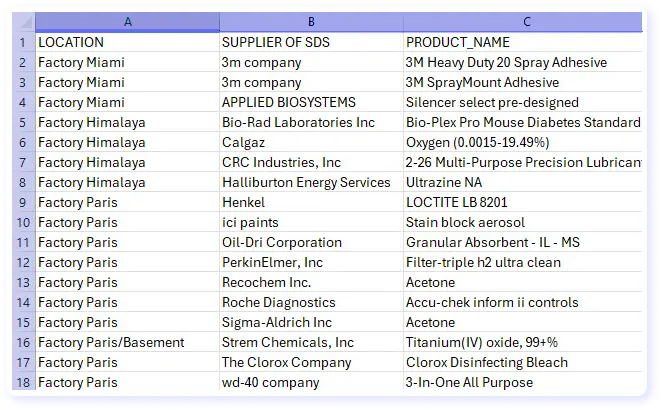
With SDS Manager you can import lists of chemicals in xls or csv format and later find the corresponding Safety Data Sheets for the chemicals.

For organizations with multiple departments, we recommend distributing our product list template to your department managers, inviting them to detail the chemicals utilized within their respective areas.

You can include information about the location of the chemical in the product list to ensure that the chemical is linked to the location where the chemical is used. You can import multiple lists.

Our import wizard allows you to map columns in the file you import to the fields used by our system.

How to set up your library by importing your product lists

1.
Product list template
For organizations with multiple departments, we recommend distributing our product list template to your department managers, inviting them to detail the chemicals utilized within their respective areas.
2.
Import wizard

When importing your product list, our import wizard matches your file structure to our data format.

You can also add your own ERP IDs (External system IDs) to the product list to ensure reference between your internal product references and the SDS library. When you later export your SDS library from SDS Manager, the export file will include the External system IDs you imported.

3.
Auto-find SDS
When importing your product lists you have the option to allow SDS Manager to auto-match Safety Data Sheets based on products in the file you import.
4.
SDS Request list
The products that you import will be listed on our SDS Request list where you can work on finding Safety Data Sheets for products that have not been auto-matched during the file import.
See more instructions

Other features you might like

Google SDS search

With our integrated Google search, you can easily find SDSs that are not yet in SDS Managers database of 30 million+ SDSs.

Import your SDS files

Create your SDS library through direct PDF imports or ZIP file uploads, which automatically organize and populate your library.

Photo feature

Build your SDS library on your smartphone by taking a photo of the product label. Enables rapid cataloging of products.

SDS Requests

Transform your SDS acquisition process into a manageable task with a dynamic to-do list of SDS Requests.

Have questions?

SDS Manager utilizes a comprehensive database containing over 30 million+ Safety Data Sheets (SDS) from various suppliers and manufacturers globally. When you import your product list into SDS Manager, the system automatically matches the product names, supplier names, and product codes you've provided with the SDS in our extensive database. This automated process is designed to find and link the correct SDS for each of your products efficiently. If the system finds matches, it will automatically add those SDS to your library. This feature significantly reduces the time and effort needed to populate your SDS library.

SDS Manager is designed to accommodate complex organizational structures, including those with chemicals stored across multiple locations and sites. You can set up a multi-level location hierarchy within SDS Manager that mirrors your organizational structure. This feature allows you to organize and manage your Safety Data Sheets based on where your chemical inventory is stored. When you import your product list, we will automatically create the location hierarchy you have defined in your xls file. When you define a product to be located at “Factory Paris/Basement” SDS Manager will automatically create a location named “Factory Paris” with a sub-location named “Basement and link the product to the “Basement” location.

Yes, SDS Manager can assist you in finding Safety Data Sheets for your products. If you are starting from scratch or cannot find an SDS for a specific product in your library, SDS Manager offers several methods to help you build or complete your SDS library:

Database Search: Utilize SDS Manager's extensive database of over 30 million+ SDSs to search for and add the necessary safety data sheets for your chemicals.

Automatic Crawling: If you need an SDS from a supplier not already in SDS Manager's crawling database, you can notify the SDS Manager team, and they will add the supplier's site to their crawler. This service is provided at no extra cost, and you will be notified once the SDS is available.

Direct Import: You can import PDF files of SDS directly into the system if you already have them, making them instantly available in your SDS library.

Supplier Request: If a supplier has not published their SDS online, SDS Manager can contact the supplier on your behalf to obtain the required SDS. Alternatively, you can request the SDS directly from the supplier and forward it to SDS Manager for inclusion in your library.

Custom Assistance: For any SDS not available through the above methods, SDS Manager's team can assist in finding and adding these to your library, ensuring you have a comprehensive and compliant SDS inventory.
Yes, any Safety Data Sheets (SDS) and the library structure you create during the free trial period of SDS Manager will be retained when you transition to a paid subscription. This ensures that the effort and time you invested in building your SDS library during the trial are not lost. Transitioning to a paid subscription is seamless, with all your data, including SDS files, product lists, and organizational structure, carried over automatically. This feature allows you to test SDS Manager's full capabilities during the trial period with the confidence that your work will remain intact and accessible once you decide to continue with a paid plan.

Ready to get started?

Schedule a demo with one of our specialists and gain unparalleled control over your safety data sheets
Start Free Trialor
30 day free trial. No credit card required.

SDS Manager AS

  • Safety Data Sheet management for users of chemicals, retailers, webshops and manufacturers

Solutions

  • SDS Manager - SDS Management, Compliance & Employee Access
  • DirectSDS - SDS Distribution for eCommerce and Distributors
  • ExactSDS - SDS Authoring, Creation & Translation

Free Tools & Services

  • Free SDS Search with Update Notifications
  • Free SDS Management Tool for Small Businesses
  • Free generator for Secondary Container Labels
  • Free Tool for Generating Transport Labels

Company

  • About Us
  • Partner Program
  • Contact Us

Address

Thunesvei 2, 0274 Oslo Norway

+44 20 3936 1240

Privacy PolicyTerms and ConditionsCertificationsService Fulfillment Policy
©2026 SDS Manager |All rights reserved